A recent update to the Microsoft Edge browser settings can cause Jobpac to lose connection after only brief periods of inactivity – Read on for more information.
We have found that a recent change in the Edge browser, may be having an impact for users of that browser, who have upgraded to the latest versions. Some users have reported repeated “Connection Lost” issues on Edge.
Microsoft Edge version 152.0.4188.0 documented in their Oct 15, 2026 release notes — “slashed default timer to 15 minutes” and other System and Performance settings changes.
Microsoft Edge
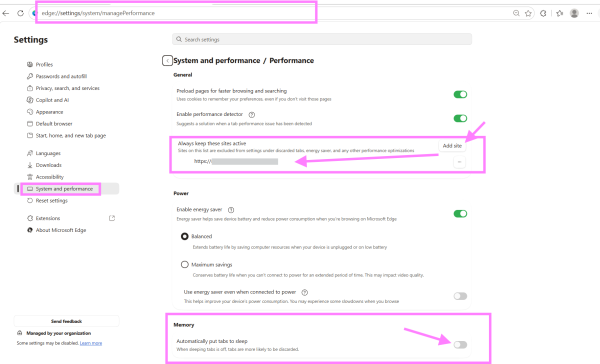
Edge lets you choose the exact inactivity timer before a tab goes to sleep:
- Open a new tab, paste
edge://settings/system/managePerformanceinto the address bar, and press Enter. - Under System & Performance, locate Put inactive tabs to sleep after the specified amount of time.
- Click the dropdown menu and change it from 15 minutes back to 2 hours (or up to 12 hours), or “toggle off” Save resources with sleeping tabs completely. Toggling off is the simplest option.
- To keep sleeping tabs enabled for everything else while protecting your portal, click Add next to Never put these sites to sleep and enter your portal’s root domain (e.g.,
https://cloud.jobpac.com.au/). Do this. - Also toggle off Efficiency mode on that same page so Edge does not throttle background JavaScript timers while you are in Word or Outlook. Do this
Close your browser and re- open after making these changes.
Always check with your IT department if you are unsure.